Subscription and billing
Your plan sets how many devices (and users) your organization can have. Plans are paid monthly or annually through Cashfree, a secure payment gateway.
Plans
Go to Subscription Plans. Each plan shows its price, what is included and its limits. Your current plan is marked Current Plan.
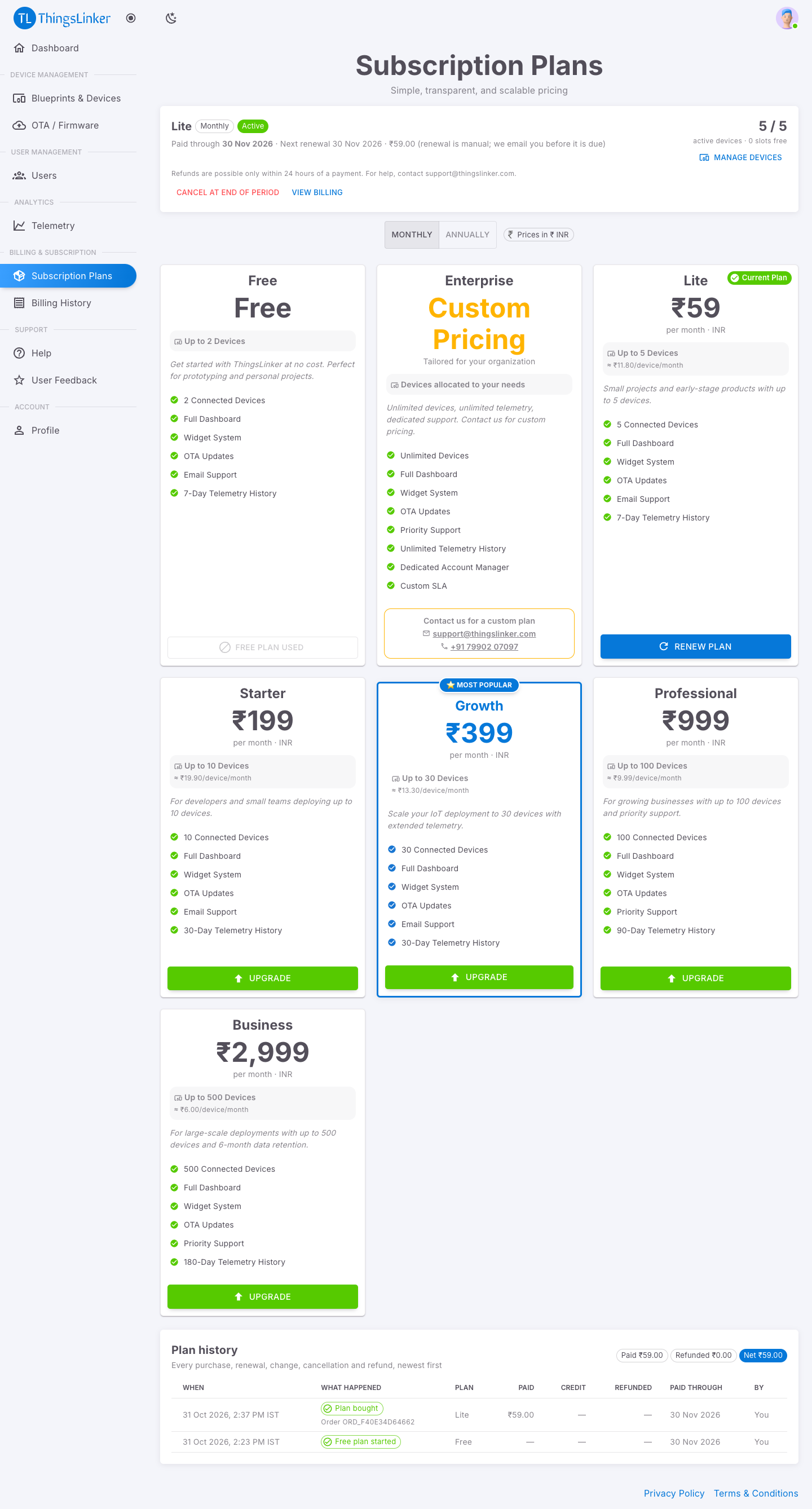
- Annual plans show how much you save compared with paying monthly, for example Save 15%.
- Some plans are priced per device: you choose the number of devices at checkout, within the plan's minimum and maximum.
- For needs beyond the listed plans, choose Contact Sales.
The free plan
The free plan runs for one month and each organization can use it once. When the month ends it stops straight away (there are no grace days), and it can never be started again: the card shows Free Plan Used. Choose a paid plan to continue.
Your subscription at a glance
The top of Subscription Plans shows your plan, monthly or annual billing, its status, the date it is paid through, the next renewal date and amount, and active devices / limit with the free slots. Manage devices opens Devices.
| Status | Meaning |
|---|---|
| Active | Paid and running. |
| Ends at period end | You cancelled: it runs to the paid-through date, then ends. Undo cancellation keeps it. |
| Grace period | A paid plan that has not been renewed yet. Everything keeps working for 7 days after the paid-through date. |
| Expired | Device activation, OTA updates and data processing have stopped. Your devices and data are kept; choose a plan to start again. |
| Custom plan active | An Enterprise plan set up by ThingsLinker. |
Renewal is manual: we email you 7 days and 1 day before the paid-through date, and again if the plan enters its grace period or expires.
Buy, upgrade or change a plan
- On Subscription Plans, choose the plan. ThingsLinker checks your active devices first; if there are too many, it says how many to deactivate, with a link to Devices.
- Confirm Your Plan Change shows your current plan, the new plan, its device limit, the price, any credit for unused time, the amount due now, when the new plan starts, the new paid-through date and the next renewal. These are calculated by ThingsLinker and are exactly what you pay.
- Choose Confirm and Pay, and pay through Cashfree's secure checkout.
Nothing changes until the payment succeeds. If the payment fails, your plan stays as it is. If you close the page after paying, the change is still applied once Cashfree confirms the payment.
| Change | What happens |
|---|---|
| Upgrade (costs more, same billing) | Starts today. The unused part of your current plan is taken off the price. |
| Monthly to annual | Starts today, with the same credit for unused time. |
| Downgrade (costs less, same billing) | Starts today with no payment. The unused value of your current plan is turned into time on the new plan, for example ₹150 left on Starter buys about 2.5 months of a ₹59 Lite plan. Your active devices must fit the new plan: if not, deactivate some in Devices first. Choose Confirm Downgrade. |
| Annual to monthly, same or fewer devices | Scheduled: you pay for one month now; it starts on your paid-through date, so your validity is extended by one calendar month (for example 11 Aug 2027 becomes 11 Sep 2027). |
| Annual to monthly, more devices | Starts today, with the credit for unused time. |
| Your credit covers the whole new price | Starts today with no payment; the credit left over becomes time on the new plan. |
| Renew the same plan | Adds one month or year after your paid-through date. |
Unused credit is never lost: it is always counted in the price of the plan you choose, or turned into time.
Scheduled changes
A change that starts later shows as a note at the top of Subscription Plans, for example Lite (monthly) starts on 30 Nov 2026. It never blocks you:
- Change your mind: choose any other plan. It replaces the scheduled change, and what you paid for it is counted as credit.
- Cancel change: drop it before it starts. What you paid for it becomes extra time on your current plan (or is refunded, if you paid within the last 24 hours).
No tax is added to the listed prices.
Which plan changes are allowed
| Change | Allowed? |
|---|---|
| Any other plan: higher or lower price, monthly or annual | Yes, as long as your active devices fit the new plan. Deactivate devices in Devices first if needed. |
| The free plan | Once only. After your free plan ends, you cannot choose a free plan again (Free Plan Used). |
| Enterprise (custom plan) | Not from the portal. Contact us at support@thingslinker.com or +91 79902 07097: ThingsLinker sets the plan up and allocates your devices, usually for a year at a time. |
| Another change while one is scheduled | Yes: the new choice replaces the scheduled one. |
Cancel a plan and refunds
- Within 24 hours of a payment the button reads Cancel and refund ₹…. You get the whole payment back, and what it did is undone: a new plan ends, an upgrade gives you your previous plan back with its time, a renewal goes back to the old paid-through date, a scheduled change is removed. The page shows until when this is possible.
- After 24 hours the button reads Cancel at end of period. There is no refund: the plan stops renewing, keeps working until its paid-through date and then ends. For help, contact support@thingslinker.com.
Your devices and data are kept either way. Undo cancellation changes your mind while the plan is still running. Refunds go back to the card or account you paid with, through Cashfree, and you get an email.
Plan history
Plan history, at the bottom of Subscription Plans and Billing History, records everything that happened to your plan, newest first: plans bought, renewals, changes, scheduled changes, cancellations and refunds. Each line shows when, what happened, the plan, what was paid, credited and refunded, the new paid-through date and who did it. The totals show what you paid, what was refunded and the net.
Billing History
Billing History shows:
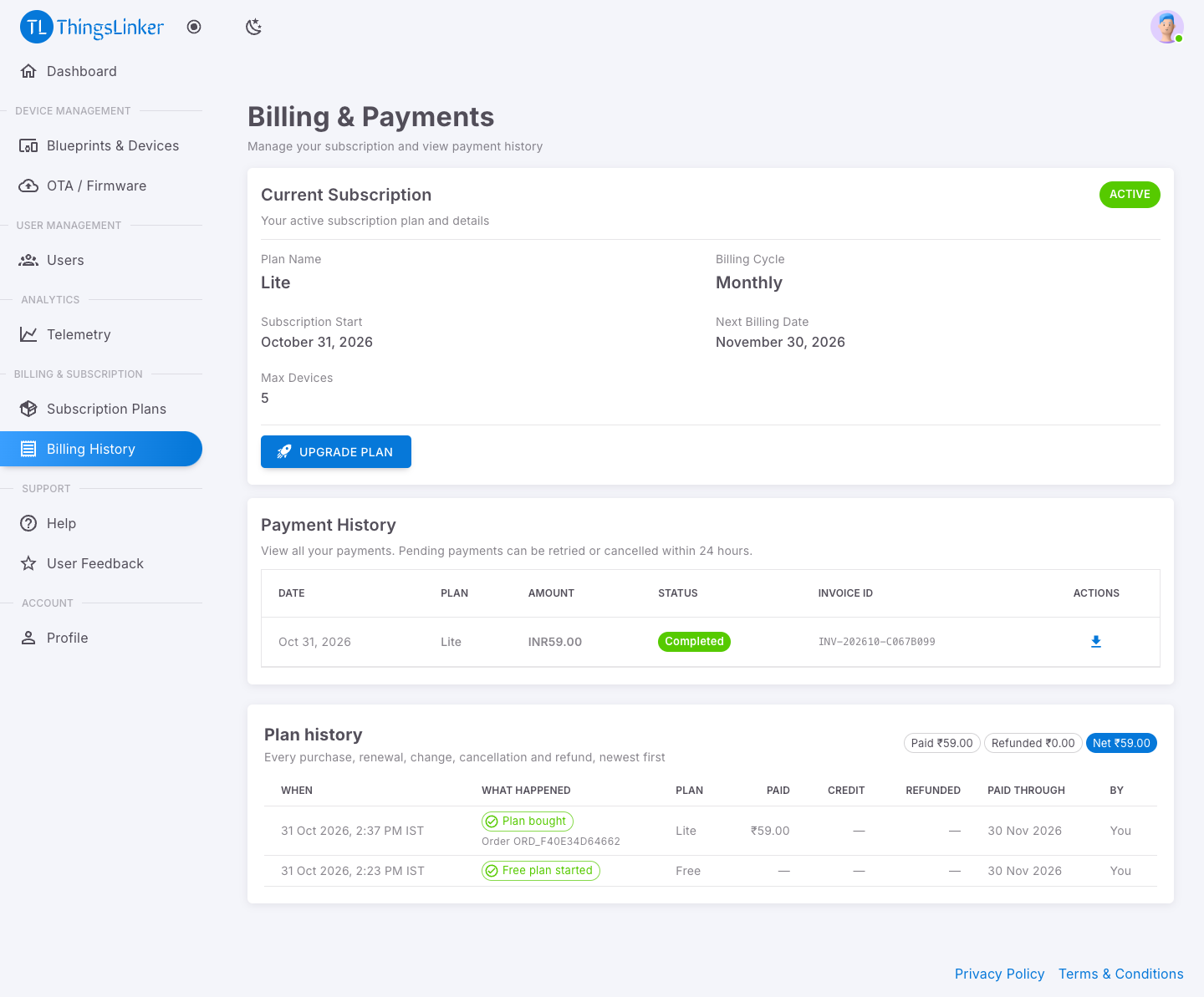
- Current Subscription: your Plan Name, Billing Cycle, Subscription Start, Next Billing Date and Max Devices, with an Upgrade Plan button.
- Payment History: every payment with its status and Invoice ID.
- Plan history: see above.
| Action | When |
|---|---|
| Download Invoice | For completed payments. If your organization name, address, city, state, postal code or country is missing, you're asked for it first; the GST number is optional. |
| Retry this payment | For a pending payment, within 24 hours. |
| Cancel this payment | For a pending payment, within 24 hours. |
GST
When GST applies, plan cards show + 18% GST (GST is added to the price) or incl. 18% GST (the price already includes it). Confirm Your Plan Change shows the taxable amount, the GST and the total you pay; the total is what Cashfree charges.
Your invoice is a tax invoice with the taxable value, the GST rate and amount, and the total. GST is shown as CGST + SGST when your state is the same as ThingsLinker's, and as IGST otherwise. Add your GST number in Profile to have it printed on your invoices.
Reaching your device limit
Your plan limits how many devices are active at once. You can create more devices than that; the extra ones start inactive. See Devices.